Introduction
This write-up looks at levels 6 to 10 of the Natas wargame on offer by Overthewire.
There's not much else to say, so, let's get started...
Level 6 -> 7
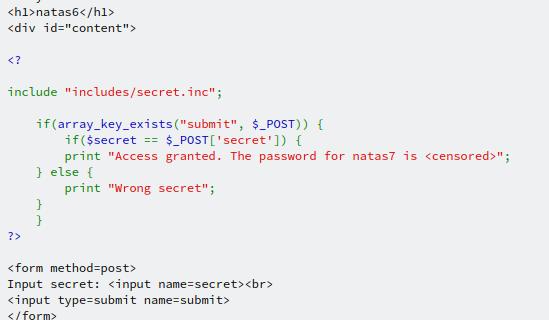
This level begins with a prompt to input a secret. Luckily, there's a button with a link to the page's source code. Looking at the source code for the page, we can see some PHP tags, which points to this page being dynamic depending on the value entered into the text box. Interestingly, there's a file inclusion for a file called secret.inc.
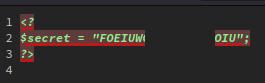
Navigating to http://natas6.natas.labs.overthewire.org/includes/secret.inc, we see a blank page. Which is not unexpected seeing as this is just a file that PHP would read. Taking a look at the source for the page, we're able to see the "secret", which can be entered into the text box on the home page, which will give us the password for the next level.
Level 7 -> 8
After logging in, we're presented with 2 links: Home and About. Clicking either one adds a page parameter to index.php... This could be useful. There's not much else here, so let's take a look at the page source.
Looking at the source, we see a comment with a little hint.

I wonder if we're dealing with Local File Inclusion or LFI (because we love our abbreviations). LFI is used to display files on the web server in the web application. This can be handy if you have a text file you want to include. The risk of this is that if you know what you're doing, you can potentially access any file on the web server! The fix for this is proper input validation of data being passed in from outside; never trust anything coming from outside of your application.
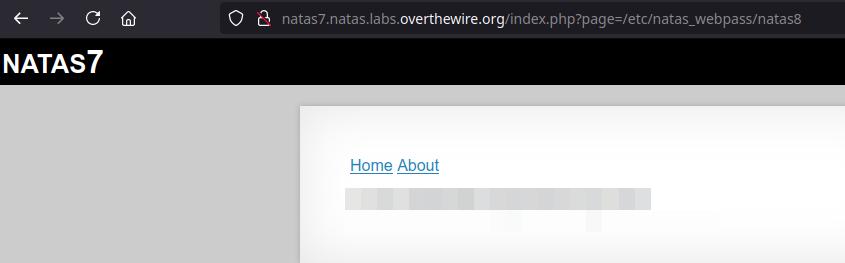
Anyway, I wonder if the hint of the password file can be used somehow. Maybe if we put /etc/natas_webpass/natas8 as the value for the page parameter...
Level 8 -> 9
Oh, will you look at that. Another secret code we need to find. Let's start by exploring the link to the source code. And just like level 6, there's some PHP code with an encoded secret, along with the steps required to reverse engineer it.
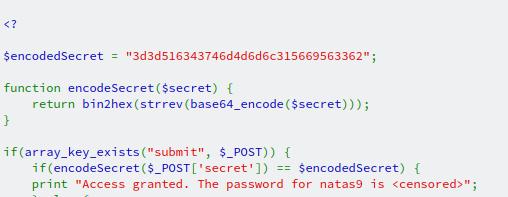
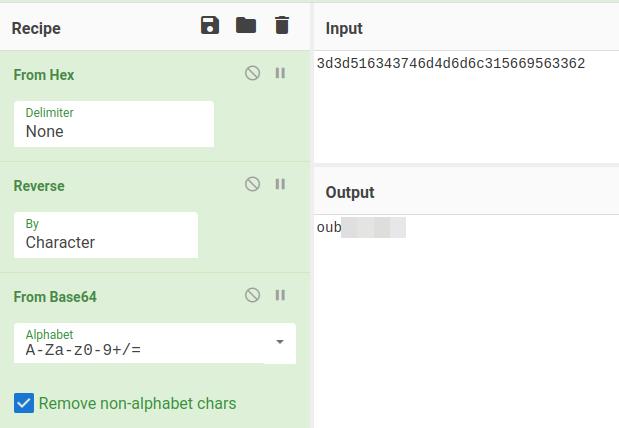
But what are those steps, and how can we decode them? We'll start with the last part by using my friend CyberChef. Starting with the outside functions and working inwards, we need to:
- Convert from hexadecimal
- Reverse the string
- Base64 decode
And once those three steps are complete, we can grab the secret to get the password for the next level.
Level 9 -> 10
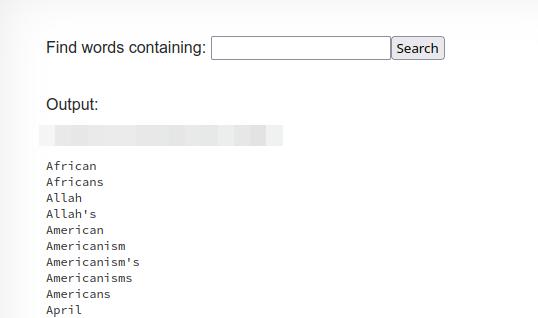
In this level, we're searching for a needle in a haystack. We're presented with a box to enter a search query. Unfortunately, entering anything in there doesn't really give us much to go on. However, we are given a chance to look at the page's source code once more; maybe that will divulge some secrets to us.
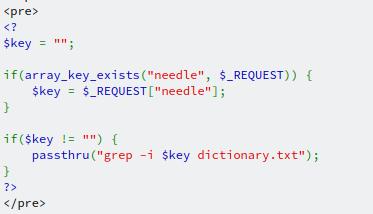
Looking at the code, we can see a couple of interesting things. The first is the passthru function, which is called searching through a text file. The second is that there doesn't seem to be any input validation (again) checking to see if what's being passed in to the function is allowed to. With this in mind, we might be able to exploit something called Command Injection, where we can insert our own commands to do more than what was initially expected. Now, what command should we try? Let's go all out and see if we can get the password for the next level, shall we?
In the search box, let's try this: key ; cat /etc/natas_webpass/natas10. But what is this? For starters, I know that this is running on a Linux system based on the command being run: grep. You wouldn't typically find this on a Windows machine unless someone had specifically installed the GNU Tools, the set of packages grep belongs to. But if you want to be certain, you can look at the response headers for your web request, in particular the Server header.
The command is separated by a ;. In *nix terms, this separates commands so that after the grep command has run, the cat command will run afterwards. And in this case, we're interested in the password for the next level.
After entering that command into the text box, we're presented with the password for level 10 and all the lines in the dictionary!
Level 10 -> 11
It looks like the devs have started to take note of not validating their inputs correctly:
For security reasons, we now filter on certain characters
Looking at the source code, we can see that is correct; there is some primative form of validation, but maybe we can bypass it?
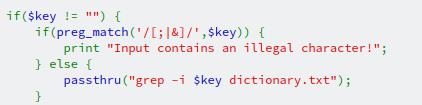
At an initial glance, we can see a regular expression is being passed into the preg_match function, and if the string contains either a ;, & or | it will trigger the error state. But what are those characters. We saw ; in the previous level as a means to separate commands. The other two are just that, a means to separate *nix commands, but they're typically used in pairs such as && or ||. So, how do we get around this check?
It's incredibly simple and could have been used in the previous level too. grep can take multiple files as a parameter to do its searching in. We would need to enter a single character for the search parameter for grep (and hope we get lucky) as well as the file we're also interested in, and that's the password for level 11. This search string might do the trick: a /etc/natas_webpass/natas11.
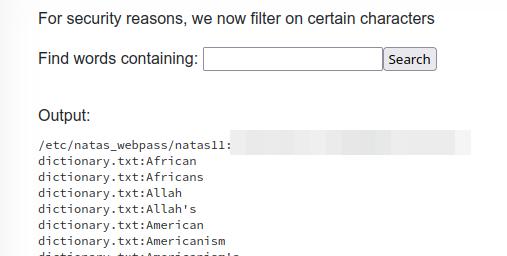
There are other methods to getting to the same answer; I just happened to get lucky this particular one worked.